


fieldmargin: manage your farm
4.049.00 Reviews
App Specs
- Version
- 9.6.6
- Updated On
- License
- Free
- Downloads
- 100,000+
- Developer
- Fieldmargin
- Categories
- Maps & Navigation
- Platform
- Android
Screenshots
 Analysis by AppCompare
When farm information is scattered across paper notes, messages, and memory, even a straightforward day can turn into a search for the latest plan. fieldmargin is designed to bring field details and day-to-day coordination together on a phone. I find that idea most useful when several jobs are underway and people need a shared reference, rather than when someone simply wants a general-purpose map.
Getting Started with fieldmargin
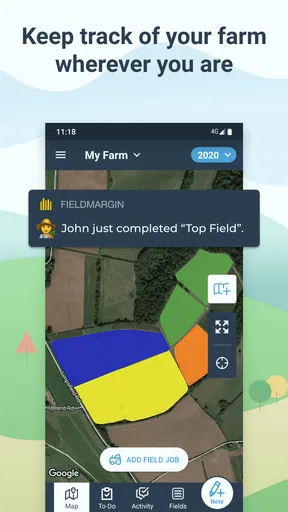
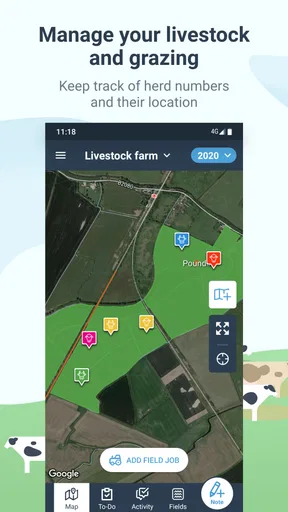
First off, let me say how refreshing it is to see an app that's not just user-friendly but actually enjoyable to navigate. Setting up fieldmargin is a breeze. You start by mapping out your fields, and trust me, the process is as simple as drawing lines on a digital map. The app uses GPS, so you can walk your fields and mark boundaries right from your phone. How cool is that?
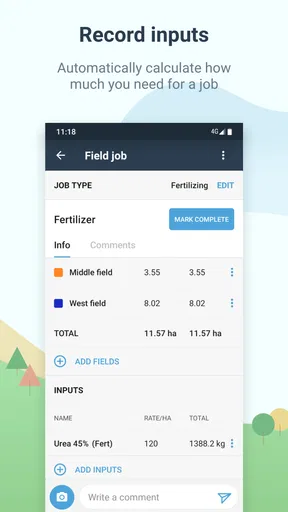
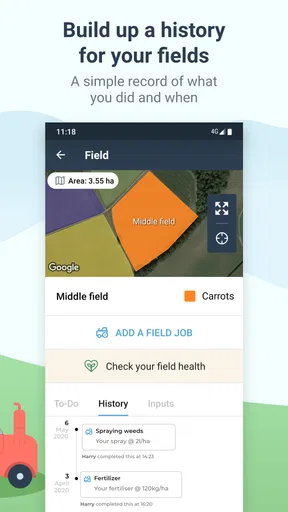
Once the fields are set, you can start adding details like crop types, tasks, and notes. It's like having a digital notepad that's always synchronized with your farming activities. I found this particularly handy for keeping track of crop rotations and planning future planting schedules.
Make the map useful before filling it with detail
My practical advice is to begin with the fields and information you rely on most, rather than trying to digitize the whole farm in one sitting. A boundary is only helpful if everyone recognizes it, so take time to check that the map is clear to the people who will use it. Then add crop and task details as they become relevant. This gives the map a job from the start and makes it easier to spot confusing entries before they spread.
For a small operation, a phone-based map can be enough to replace the notebook you carry between fields. On a larger farm, it can serve as a shared orientation layer, but it works best when the team agrees on simple naming habits. Consistent field names and concise notes matter more than a large volume of entries: a colleague trying to find a field during a busy shift should not have to guess which label is current.
The Features You’ll Love
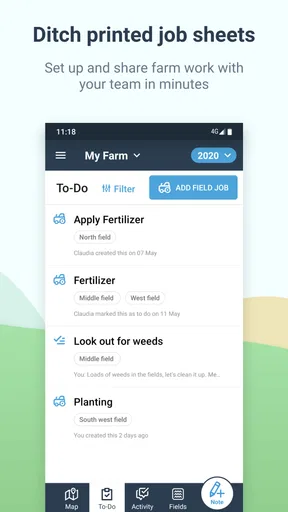
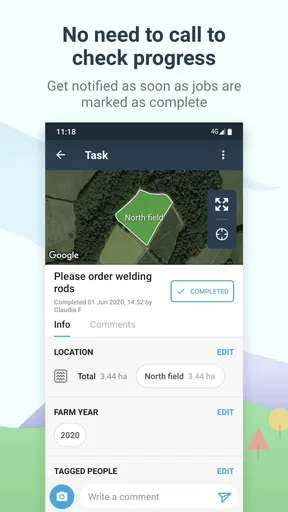
Now, let’s dive into some of the standout features. One of my favorites has to be the task management tool. You can assign tasks to team members, set deadlines, and even attach photos or notes. It's like having a personal farming assistant who ensures nothing slips through the cracks. Plus, the app sends reminders, so you never miss a beat.
Another gem is the weather integration. Knowing the forecast can be a game-changer in farming, and fieldmargin provides real-time weather updates. You’ll get insights on temperature, wind, and rainfall, helping you make informed decisions on irrigation and harvesting.
Worth Reading Before You Choose

EA SPORTS FC Mobile 26 Is a Bigger Football Game, but It Takes Time

Flipboard Shows What News Apps Must Do Beyond the Feed

Switching to Android Auto Means Rethinking Your Driving Routine

Google Calendar Makes a Crowded Week Easier to Manage

Ludo King Makes the Most of the Minutes Between Plans

Baby Panda World Brings Quick Play to Modern Phones, but Its Game Library Feels Busy
Where everyday workflows can snag
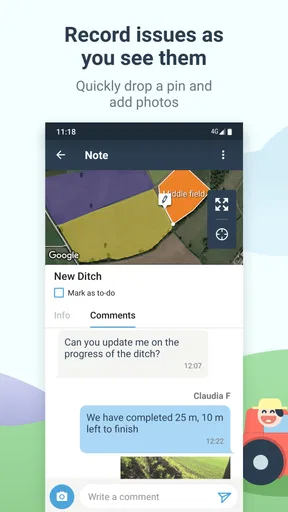
The useful question is not just whether a task can be entered, but whether the person doing the work can understand it quickly. I’d keep assignments specific: name the field, describe the job in plain language, and attach a photo or note when a visual detail could prevent a return trip. A task list is less valuable if workers need to call someone to interpret every item.
Weather information is a convenient planning aid, not a substitute for checking conditions where the work is actually happening. A forecast can help decide what to prepare for, but local ground and crop conditions still matter. I would use it to inform a decision, not let a single forecast settle a time-sensitive choice on its own.
Collaboration Made Easy
If you’re running a farm with a team, the collaboration features are a godsend. You can share maps, tasks, and notes with your crew, making communication seamless. I particularly liked the chat function, which keeps all conversations in one place. No more endless email chains or misplaced messages!
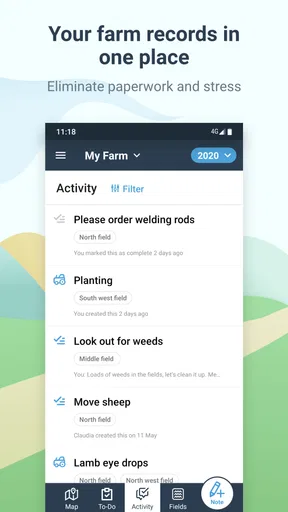
Fieldmargin also allows you to track team activities, so you know who did what and when. This transparency is invaluable for both accountability and efficiency.
A realistic day on the farm
Imagine starting the morning by checking which jobs are planned, then heading out to a field where a task needs a little more context. A map can help orient you; a note or photo can clarify what needs attention; and a shared task gives the rest of the team a place to see the plan. Later, someone can check the activity record rather than relying on a half-remembered conversation. That chain is where the app can earn its place: not through one dramatic feature, but by reducing small coordination gaps across the day.
There is a trade-off, though. Shared records stay useful only if the team actually updates them. If some workers prefer verbal instructions or do not have time to enter details, the app can become an incomplete second version of the farm’s real workflow. I’d agree on which tasks belong in the app and keep that habit modest enough to maintain during busy periods.
Data at Your Fingertips
One of the major benefits of using fieldmargin is the insights it provides. The app generates reports that help you analyze your farm’s performance. Whether it’s tracking yields or analyzing labor costs, having this data on hand helps in making strategic decisions. And let's be honest, who doesn't love a good pie chart?
Plus, the app is cloud-based, meaning your data is safe and accessible from anywhere. Whether you're in the tractor seat or at home, your farm information is just a tap away.
What to check when something seems wrong
If a mapped position looks off, I would first check whether the phone is getting a dependable GPS position and whether I am standing where I intend to record the boundary. Walking the perimeter carefully and reviewing the shape before relying on it is a sensible habit; a quick mark made while moving may not represent a clean field edge. If the map seems stale, check that the device is connected and allow the app time to show the latest shared information before assuming a record has disappeared.
For a task that appears missing, the simplest recovery is to confirm the field, assignee, and wording used, then ask the team whether the work was recorded under a different description. For team coordination, a short direct conversation can resolve ambiguity faster than creating duplicate tasks. Keeping one clear record is better than adding several near-identical entries that later muddy the history.
Room for Improvement
While fieldmargin is impressive, there's always room for growth. Personally, I’d love to see more integration with other farming tools and software. This would make it even more central to farm management. Also, while the app is intuitive, new users might benefit from a more detailed tutorial or onboarding process.
Another feature that could be enhanced is offline access. While most of us have good internet coverage, there are times when you’re in the field without service, and having full offline functionality would be a plus.
When another tool may suit you better
Compared with a paper notebook, this app offers a shared map and a more organized place for tasks and notes, but paper can be quicker for a solo farmer who only needs a personal reminder. A general mapping app may be preferable if your main goal is navigation rather than keeping farm work and field records together. Likewise, a farm already committed to a specialist system may not benefit from maintaining a second set of records unless the team has a clear reason to do so.
Connectivity is worth thinking through before depending on a cloud-based workflow in remote fields. I would prepare important work details before heading out and avoid treating the phone as the only copy of essential operational information. The app’s map and collaboration approach is strongest when access is reliable and people consistently use it; where those conditions do not hold, a simple offline backup or established farm process may be more dependable.
Who should give it a try
Fieldmargin is a good fit for farmers who want field maps, notes, and team tasks in one working space, especially when jobs pass between several people. It may also help someone moving from paper records who wants to build a field-by-field picture gradually. The app is free to download, with in-app purchases ranging from $4.49 to $399.99 per item, so I’d check the purchase options against the needs of the farm before building a workflow around paid capabilities.
It is available in the Maps & Navigation category, comes from developer Fieldmargin, and has an average rating of 4.0 from 434 ratings, with 100K+ installs. It is rated Everyone, was released on January 24, 2017, and its current version is 9.6.5, requiring Android 8.0 or later. Those details make it easy to assess basic compatibility, but the more important decision is whether your team will keep field information current.
Final Thoughts
All in all, fieldmargin is a robust tool that can revolutionize how you manage your farm. It’s like having a farm manager in your pocket—keeping you organized, informed, and connected. Whether you’re a small-scale farmer or managing a large operation, this app is worth checking out.
So, if you're looking to streamline your farming processes and embrace a bit of tech-savvy organization, why not give fieldmargin a try? You might just wonder how you ever managed without it!
My recommendation comes with one condition: start with a real routine you want to improve, such as assigning field jobs or keeping crop notes together, and see whether the team finds the shared record easier to maintain than its current method. If you mainly need reliable navigation, extensive offline use, or tight links to other specialist systems, compare alternatives before switching. For farms that value a practical map and coordinated day-to-day records, though, this is a sensible place to begin.
Pros
- User-friendly interface simplifies farm management.
- Real-time collaboration with team members.
- Customizable maps for easy field tracking.
- Offline mode ensures access without internet.
- Integrates well with other farming tools.
Cons
- Limited advanced features for large farms.
- Data export options could be more robust.
- Occasional syncing issues reported.
- Some features require a premium subscription.
- Initial setup can be time-consuming for beginners.
FAQs for fieldmargin: manage your farm
What is fieldmargin and how can it benefit my farming operations?
Fieldmargin is a comprehensive farm management app designed to simplify the organization and tracking of various farming activities. It allows farmers to map fields, record observations, plan tasks, and collaborate with team members. By using fieldmargin, you can improve efficiency, reduce paperwork, and gain better insights into your farm's performance.
Is fieldmargin available for both Android and iOS devices?
Yes, fieldmargin is available for both Android and iOS platforms. You can download it from the Google Play Store or the Apple App Store. This cross-platform availability ensures that you can manage your farm operations on your preferred device, ensuring flexibility and convenience.
Does fieldmargin require an internet connection to function?
Fieldmargin can be used offline, which is particularly beneficial for farms located in remote areas with limited internet connectivity. While an internet connection is needed for initial downloads and updates, the app stores data locally, allowing you to access and input information without active internet access.
Is my farm data secure with fieldmargin?
Fieldmargin takes data security very seriously, implementing measures to protect your information. The app uses encryption and secure servers to ensure that your farm data is safe. Additionally, you maintain control over who has access to your data, allowing you to manage permissions among your team.
Are there any costs associated with using fieldmargin?
Fieldmargin offers a free version with basic features, suitable for small-scale operations. For larger farms or more advanced functionalities, a subscription to the Pro version is available. This subscription provides additional features such as satellite imagery and more detailed reporting tools to enhance your farm management experience.


